
Frequently Asked Questions (FAQ)
General
How do I install Paperback version 0.9?
Answer
Paperback version 0.9 is still in development. It's accessible through TestFlight for Papaerback Patreon supporters and Discord boosters. More info can be found on the official Paperback website.
How do I find what version of Paperback I am using?
Answer
- Tap the cog icon to open Settings.
- iOS:
- macOS/iPadOS:
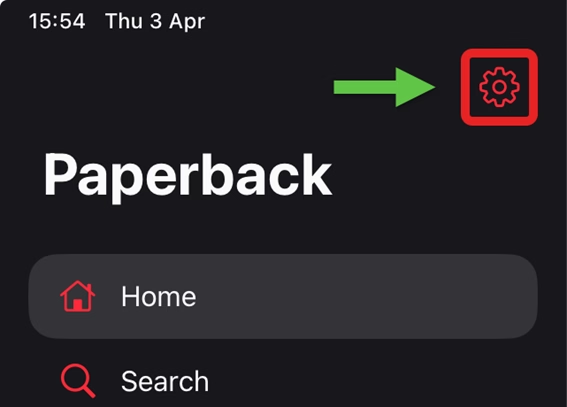
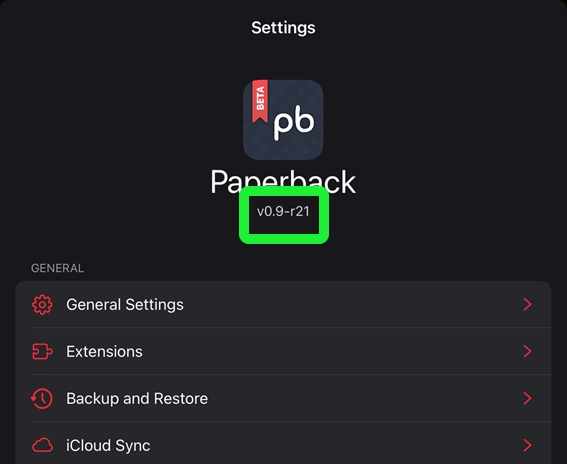
- The version number can be found under the Paperback logo and name (e.g. v0.9-r21).
How do I find an extension's version?
Answer
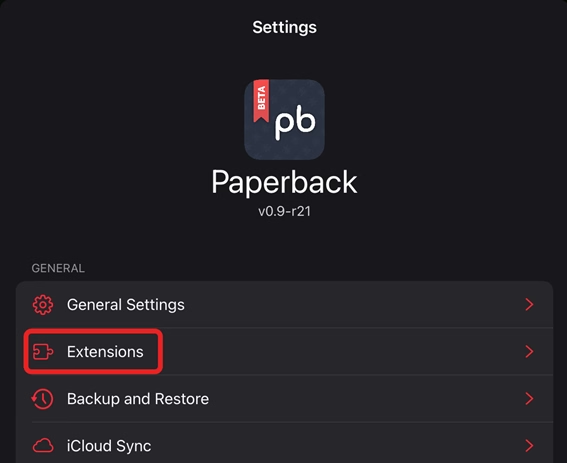
- Tap the cog icon → Settings → Extensions.
- iOS:
- macOS/iPadOS:
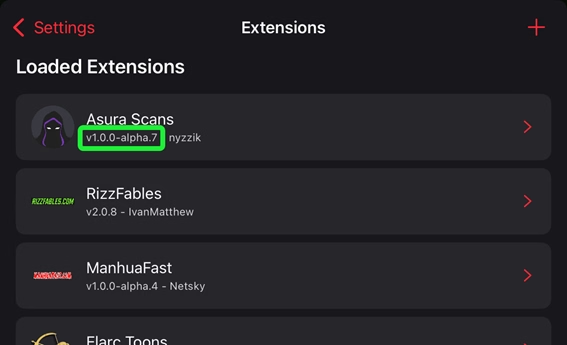
- The extension's version number will be displayed underneath its name.
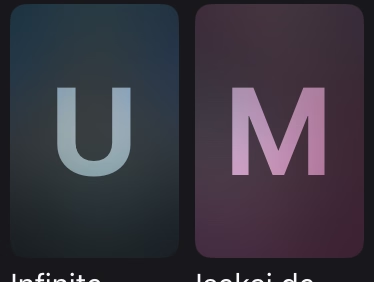
Why do I have blurred covers with a letter (U, M or A) on them?
Answer
This is due to your content settings. Check out the Content Settings Guide for instructions on how to change this.
What are the best extensions to install?
Answer
This is a highly subjective question which we often won't have an answer for. You can check other sites like everythingmoe.com which try to answer this question as best as possible.
Does site X have an extension?
Answer
The easiest way to check this is through the Extension List page on this website.
Are there any Western Comic extensions?
Answer
Currently, Inkdex does not provide any Western Comic extensions. However, the Batcave, ReadAllComics, and ReadComicsOnlineRu extensions can be found in other repositories not maintained by Inkdex. Head over to our Discord server for more information!
What extension has title X?
Answer
We don't know this either. You can check other sites like kuroiru.co which try to answer this question as best as possible. Alternatively you can search for your title on the internet to find which site hosts it, and then checking if that site has an extension.
How do I request an extension?
Answer
Extension requests are submitted through the /request-extension slash command in our Discord server.
It will ask you for a valid URL (starts with "https://") of the site in question and a reason as to why it should be turned into an extension.
Are extension requests guaranteed to be fulfilled?
Answer
No. Requests and their upvotes serve only as a guide to help developers discover which extensions the community wants most.
How can I improve the chances of my request being picked up?
Answer
Your request is much more likely to be selected if it meets the following criteria:
- Uniqueness: The website offers content not available elsewhere.
- Quality: The website is reliable, fast, and has good image quality.
- Justification: The description clearly states why the website should be implemented.
Why hasn't my request been picked up yet?
Answer
Common reasons for a request being overlooked or ignored include:
- Redundancy: Most titles are already available via existing extensions. Developers rarely build new extensions for websites which have little new to offer.
- Language Barriers: We have a small team of active developers who primarily speak English, so non-English websites are less likely to be implemented.
- Justification: The request description did not provide a clear reason why the website should be added.
Can I build the extension myself?
Answer
Yes! The fastest way to get an extension added is to create it yourself. Check out our extension development guide to get started.
Are external repositories/extensions safe to use?
Answer
All repositories/extensions provided by Inkdex are well maintained to ensure they are safe to use. Their code and release methods are open source, meaning you can inspect them on GitHub.
In our Discord server, you will be able to find other repositories which are not maintained by Inkdex and thus do not have the same guarantees; however, in general, extensions cannot do harm to your device. If you are doubtful about a certain extension, don't use it, or check its source code on its respective GitHub repository.
Is there any copyrighted material hosted?
Answer
Inkdex does not host or distribute any content for which it does not hold the rights.
Extensions are simply scripts that pull content from other sites that may host these items. This means that extensions themselves do not contain copyrighted content, but the websites they access might.
The Inkdex project is in no way affiliated with any of the websites its extensions may access.
How do I filter out duplicate chapters?
Answer
Some titles may have several chapter groups, resulting in duplicate versions of the same chapter.
You can configure Paperback to limit this to one version per chapter:
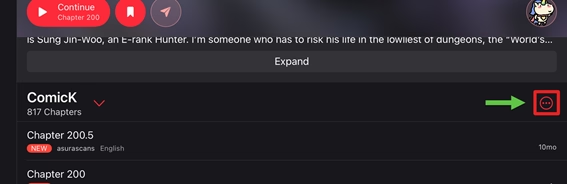
- Open the title view so that the chapter list is displayed.
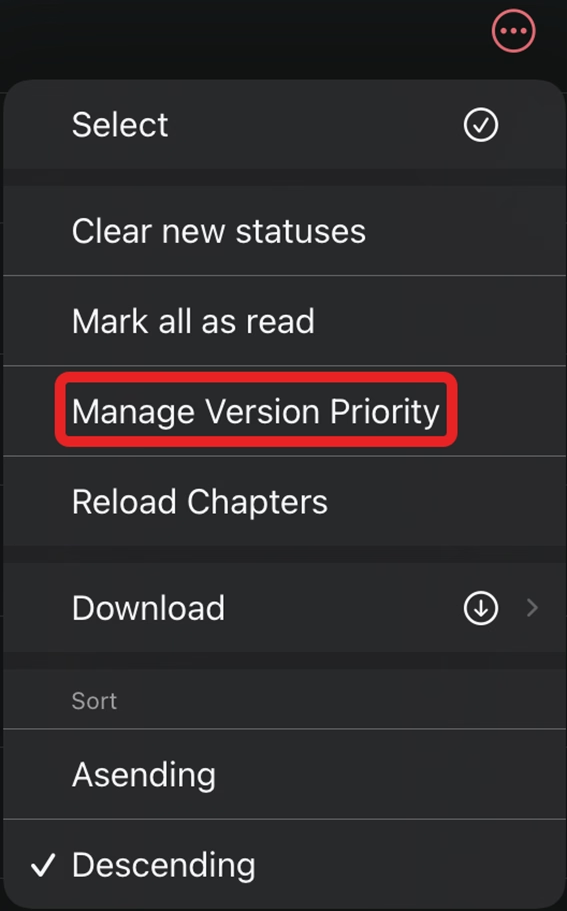
- Tap the ellipsis icon (...) → Manage Version Priority.
- A page titled Title Settings will open.
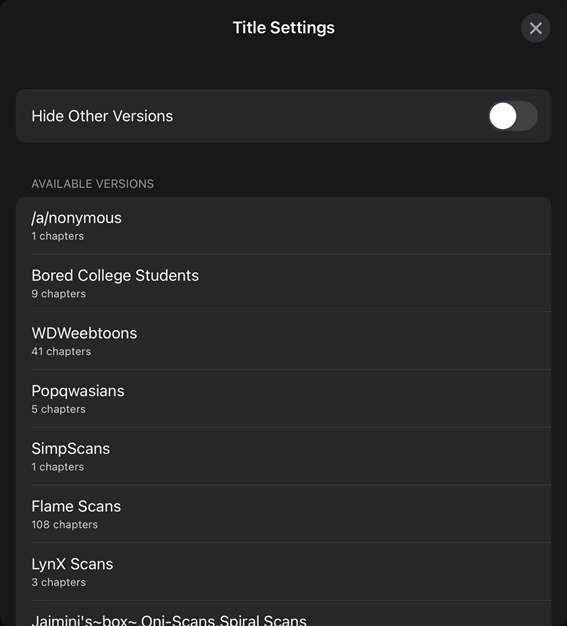
- In the section titled Available Versions, tap one or more groups to move them up to the Prioritised Versions section.
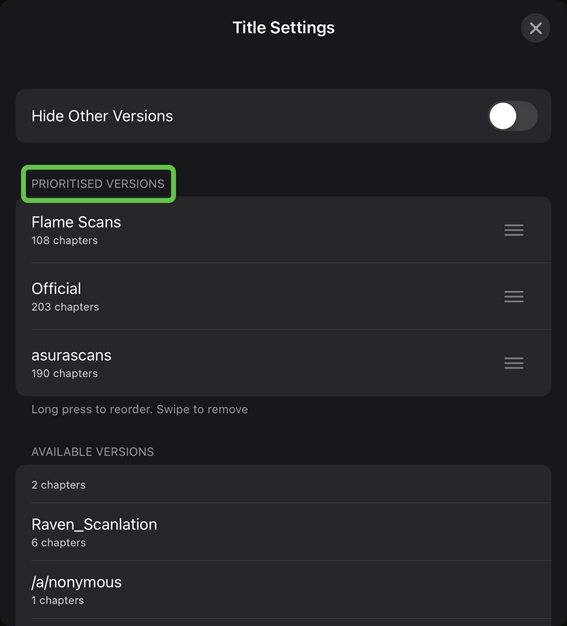
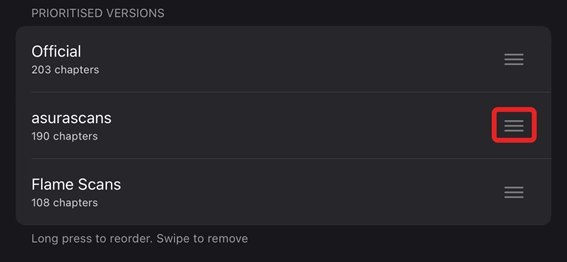
- If you have more than one group in the Prioritised Versions section, you can long-press the hamburger icon and drag to reorder them. The order determines the priority used for selecting chapter versions.
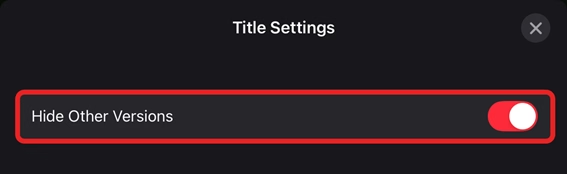
- If you enable the Hide Other Versions setting, it will only display those listed in the Prioritised Versions section. It will display another group only if those in Prioritised Versions do not have that specific chapter available.
Specific Extensions
Bato.To or MangaPlus - How do I remove titles in other languages?
Answer
- Tap the cog icon → Settings → Extensions.
- iOS:
- macOS/iPadOS:
- Tap the extension whose language settings you wish to adjust.
- Tap Settings → Languages.
- Select the language(s) you want to read; a tick will appear next to them.
MangaDex or MangaFire - How do I remove titles in other languages?
Answer
- Tap the cog icon → Settings → Extensions.
- iOS:
- macOS/iPadOS:
- Tap the extension whose language settings you wish to adjust.
- Tap Settings → Content Settings → Languages.
- Select the language(s) you want to read; a tick will appear next to them.
MangaDex - Why are some titles/chapters available on the site not showing in Paperback?
Answer
There are two common reasons for this:
- MangaDex itself is filtering content.
- Tap the cog icon → Settings → Extensions.
- iOS:
- macOS/iPadOS:
- Tap MangaDex.
- Tap Settings → Content Settings → Content Rating.
- The chapters are not hosted on MangaDex, but instead link to external sites.
- Open the title in Paperback.
- If the title is hosted externally, you will see the following error:
An error occurred
A Javascript error occurred: Chapters are hosted externally outside MangaDex, you will need to use another source or read it online.
MangaBox-themed sites - Why do pages have gaps or splits on the displayed pages?
Answer
MangaBox-themed sites (e.g., Manganato, Mangakakalot, MangaBat) have switched from paged chapters to long vertical strips, cropping images in irregular sizes.
Trying to read titles from these extensions with the horizontal reader will cause them to display improperly; this is not something that can be fixed at this moment.
The only available fix is to always use Paperback's vertical reader without page padding when reading titles from these extensions.